¶ Uploading data via spreadsheet
This help page provides guidance for public bodies on uploading data to the M&R system from spreadsheet files.
¶ Key rules
- Only use the latest version of the designated M&R upload template for uploading to the M&R system. This should be downloaded directly from the M&R system.
- Carefully review the ‘Read Me’ worksheet in the template before uploading.
- Do not insert, delete, rename or rearrange any rows, columns or worksheets in any upload template.
- Complete all mandatory fields before uploading. Refer to the colour-coding to identify mandatory fields.
- Pay attention to the format of the data entered. Use dropdowns, where available, to avoid invalid values.
- After upload, a confirmation email will indicate which records were processed successfully. It will also list any records that failed to upload.
¶ Upload templates
This tables summarises the upload templates that are available for public bodies and provides links to step-by-step guidance on using each.
| Upload template | Purpose | Downloadable from | Step-by-step guidance | Additional information |
|---|---|---|---|---|
| Add MPRNs | Add & edit MPRNs | MPRNs (electricity) data input screen → ‘Add MPRNs’ (tab) → ‘Bulk upload (best for 10+ MPRNs) → 'Download' | Add MPRNs | Cannot be used for annual MPRN validation |
| Validate & manage MPRNs | Validate MPRNs | MPRNs (electricity) data input screen -→ ‘Validate & manage MPRNs’ (tab) → 'Download' | Validate MPRNs | Can also be used for adding MPRNs |
| Add GPRNs | Add & edit GPRNs | GPRNs (gas) data input screen → ‘Add GPRNs’ (tab) → ‘Bulk upload (best for 10+ GPRNs) → 'Download' | Add GPRNs | Cannot be used for annual GPRN validation |
| Validate & manage GPRNs | Validate GPRNs | GPRNs (gas) data input screen → ‘Validate & manage MPRNs’ (tab) → 'Download' | Validate GPRNs | Can also be used for adding GPRNs |
| Projects | Add & edit projects | Energy projects data input screen → 'Download' | Add projects; edit projects | |
| Vehicle inventory | Add & edit vehicles; report annual inventory | Vehicles data input screen → ‘Vehicle inventory’ (tab) → 'Download' | Update vehicle inventory | |
| Vehicle procurement contracts | Add & edit vehicle procurement contracts | Vehicles data input screen → ‘Vehicle procurement contracts’ (tab) → 'Download' | Add contracts | |
| Vehicle procurement drawdowns | Add & edit vehicle procurement drawdowns | Vehicles data input screen → ‘Vehicle procurement drawdowns’ (tab) → 'Download' | Add drawdowns | Can only be used to upload drawdowns for contracts that have already been reported |
| Building register | Add & edit buildings; update building register | Building register data input screen → 'Download' | Update building register; add buildings; edit buildings | |
| Commercial flights | Add, edit & delete flight segments | Business travel data input screen → ‘Commercial flights’ → 'Download' | Report flight segments | Can be used to delete records from M&R software (unlike all other templates) |
¶ Template colour coding
¶ Worksheet tabs
Worksheet tabs are colour-coded as follows:

- The red ‘read me’ tab provides important guidance on using the template.
- Green tabs are where you should enter or edit data for uploading to the system. These are the only worksheets in which you should edit data.
- Purple tabs are usually labelled FYI (for your information) and provide additional information that may be useful for understanding your data and structuring your upload data. You should not edit data in these tabs.
- Tabs without any colour-coding are data reports, i.e. they contain output data from the M&R system. Data in these worksheets should not be edited. You should not edit data in these tabs. Note that the actual colour displayed on the ‘no colour’ tabs may depend on your Excel configuration.
¶ Column headers
Column headers are colour-coded as follows:
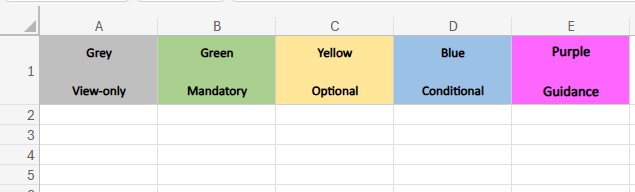
- Grey columns are read-only. You should not edit data in these columns under any circumstances.
- Green columns are mandatory. You must valid data in these columns for every record (row). The upload will fail if cells in green columns are left blank.
- Yellow columns are optional. It is not necessary for you to enter data in these columns for the system to accept your upload. However, depending on the circumstances, leaving cells in yellow columns blank could mean that your data is incomplete and could affect the calculation of results for your organisation, i.e. just because you have chosen to leave a cell in a yellow column blank it does not mean that your data is complete or 'right'!
- Blue columns are conditional. This means that entering data may be mandatory for some records (rows) but not mandatory for others, depending on other data entered for the same record (in the same row). Guidance is provided in a purple column on the right of the table which indicates the specific record(s) (row(s)) for which the blue columns are mandatory. The upload will fail if mandatory data is omitted. For example, when reporting an energy project, if you classify the project status as either ‘implemented’, ‘planned’ or ‘tentative’ you must enter a value for the implementation year. If you classify the project status as 'potential opportunity', then reporting an implementation year is optional. So, ’implementation year' is a conditional (blue) column. The upload will fail if this column is left blank for a ‘implemented’, ‘planned’ or ‘tentative’ project, but the upload will execute successfully if the column is left blank for a 'potential opportunity'.
- Purple columns provide important row-specific guidance on which fields are mandatory for each record. These are always located to the extreme right-hand side of spreadsheet tables and the text indicates exactly which columns are mandatory for that row. You should not edit data in these columns.
¶ Unique identifier
Every row in an upload file must contain a unique identifier that corresponds to a unique M&R record. Except where indicated otherwise, the unique identifier is in column A of each template. The table below summarises the rules that apply when you enter different values for the unique identifier in a new row added to an upload template.
| Upload template | Worksheet | Unique identifier | Value entered in ID column for new row = | |||
|---|---|---|---|---|---|---|
| Column | Valid entry | The word ‘New’ (without quotes) | Valid & unique entry | Valid & non-unique entry | ||
| Add MPRNs | MPRNs-Add | MPRN | 11-digit MPRN | Row will be ignored & error message will issue | New MPRN record will be created | Existing MPRN record in software will be updated with data from the last (bottom) record that contains the non-unique ID |
| Validate & manage MPRNs | MPRNs | MPRN | 11-digit MPRN | |||
| Add GPRNs | GPRNs-Add | GPRN | GPRN (up to 7 digits) | Row will be ignored & error message will issue | New MPRN record will be created | Existing MPRN record in software will be updated with data from the last (bottom) record that contains the non-unique ID |
| Validate & manage GPRNs | GPRNs | GPRN | GPRN (up to 7 digits) | |||
| Projects | Projects | ID | ‘New’ or software-created ID | New project record will be created & software will create an ID | Row will be ignored & error message will issue | Existing project record in software will be updated with data from the last (bottom) record that contains the non-unique ID |
| Vehicle inventory | Vehicle inventory | Category | Software-created vehicle category | Row will be ignored & error message will issue | Row will be ignored & error message will issue | Row will be ignored & error message will issue |
| Vehicle procurement contracts | Contracts | ID | ‘New’ or software-created ID | New contract record will be created & software will create an ID | Row will be ignored & error message will issue | Existing contract record in software will be updated with data from the last (bottom) record that contains the non-unique ID |
| Vehicle procurement drawdowns | Drawdowns | ID | ‘New’ or software-created ID | New drawdown record will be created & software will create an ID | Row will be ignored & error message will issue | Existing drawdown record in software will be updated with data from the last (bottom) record that contains the non-unique ID |
| Building register | Buildings | ID | ‘New’ or software-created ID | New building record will be created & software will create an ID | Row will be ignored & error message will issue | Existing building record in software will be updated with data from the last (bottom) record that contains the non-unique ID |
| Commercial flights | 20XX | Combination of inputs in columns A-F constitute the unique identifier | Row will be ignored & error message will issue | New flight record will be created | Flight record will be combined with record that has same non-unique entry | |
¶ Data upload rules
This section describes how the M&R system treats different inputs, edits, omissions and errors in upload files. The table below lists detailed validation rules for uploads. These are the automatic checks that the M&R software undertakes on your uploads. Note:
- Each of the rules presented in the table is standalone.
- ‘Failing’ any one rule can be sufficient for an upload to fail.
- Passing all relevant rules is required for a successful upload.
- ‘When adding a record’ refers to when your upload template contains an additional spreadsheet row, e.g. for adding an additional MPRN, building, vehicle contract, etc. to the M&R system.
- ‘When updating a record’ refers to when your upload template edited data in an existing spreadsheet row, e.g. if you have edited details for an MPRN, building or vehicle contract, etc. that is already in the M&R system.
Remember that the M&R software always issues an email after an upload attempt - that either confirms the successful upload or identifies specific problem(s) with it.
| Scenario | Scope | Impact on upload & on data in M&R software | |
|---|---|---|---|
| Upload template not in Excel format | All uploads | Upload will fail. No records will be added or updated. | |
| Missing worksheet | Green worksheet | All uploads | Upload will fail. No records will be added or updated. |
| Red or purple worksheet | All uploads | Upload will execute normally. | |
| Incorrect or mis-spelled worksheet name | All uploads | Upload will fail. No records will be added or updated. | |
| Blank row between records | All uploads | Upload will execute, but all records after blank row will be ignored. | |
| Blank column between other columns | All uploads | Upload will fail. No records will be added or updated. | |
| Blank column heading between other columns | All uploads | Upload will fail. No records will be added or updated. | |
| Column missing | Mandatory column | All uploads | Upload will fail. No records will be added or updated. |
| Optional column when adding a record | All uploads | Upload will execute, but M&R field corresponding to optional column will be set to null. | |
| Optional column when updating a record | All uploads | Upload will execute, but M&R field corresponding to optional column will not be updated. | |
| Column heading incorrect or mis-spelled (including extra spaces, incorrect letters, number or other characters) | Mandatory column | All uploads | Upload will fail. No records will be added or updated. |
| Optional column when adding a record | All uploads | Upload will execute, but M&R field corresponding to optional column will be set to null. | |
| Optional column when updating a record | All uploads | Upload will execute, but M&R field corresponding to optional column will not be updated. | |
| Column heading is spelled correctly but uses different case, e.g. ‘Year’ v ‘YEAR’ v ‘year’ | All uploads | Upload will execute normally. | |
| Columns in different order to those in template (as downloaded) | All uploads | Upload will execute normally. | |
| Extra column with user-defined heading | All uploads | Upload will execute normally. Extra column will be ignored. | |
| Duplicate columns with valid data (both columns have the same headings) | All uploads | Upload will execute, but system will be updated with data from the last (right-most) duplicate column. | |
| Duplicate rows with valid data (both rows have the same record identifier) | All uploads | Upload will execute, but system will be updated with data from the last (bottom) duplicate row. | |
| Mandatory cell is blank | When adding a record | All uploads | Upload will execute, but record with blank mandatory cell will not be added. |
| When updating a record | All uploads | Upload will execute, but record with blank mandatory cell will not be updated. | |
| Optional cell is blank | When adding a record | MPRNs & GPRNs | Upload will execute, but if ‘validation status’ left blank it will be set to ‘please select', if ‘attributable %’ left blank it will be set to 0%, and if any other optional cell left blank, it will be set to null. |
| When updating a record | MPRNs & GPRNs | Upload will execute, but if ‘validation status’ left blank it will not be updated, if ‘attributable %’ left blank it will not be updated, and if any other optional cell left blank, it will be set to null. | |
| When adding a record | All other uploads | Upload will execute, but M&R field corresponding to optional cell will be set to null. | |
| When updating a record | Upload will execute, but M&R field corresponding to optional cell will be set to null, which may overwrite existing value. | ||
| Mandatory cell contains invalid value | When adding a record | All uploads | Upload will execute, but record with invalid value in mandatory cell will not be added. |
| When updating a record | All uploads | Upload will execute, but record with invalid value in mandatory cell will not be updated. | |
| Optional cell contains invalid value | When adding a record | All uploads | Upload will execute, but record with invalid value in optional cell will not be added. |
| When updating a record | All uploads | Upload will execute, but record with invalid value in optional cell will not be updated. | |
| Cell with dropdown menu options contains value with extra white space, e.g. ‘Office building ’ instead of ‘Office building’ | All uploads | Upload will execute normally. | |
| Cell with dropdown menu options contains value with different case, e.g. ‘Office building’ v ‘OFFICE BUILDING’ | All uploads | Upload will execute normally. | |
| Existing record is not included in upload file, i.e. row that did contain a record in downloaded template is deleted or completely cleared prior to upload. | Flights | Upload will execute normally and the flight record will be deleted from the M&R system. | |
| All other uploads | Upload will execute normally. There will be no change to the M&R software record corresponding to the record that was deleted from the upload file. | ||
| New row in template | Unique identifier = 'New' | All uploads | See unique identifier table |
| Unique identifier = valid & unique value | All uploads | See unique identifier table | |
| Unique identifier = valid & non-unique value | All uploads | See unique identifier table | |
¶ Deleting data via upload
With one exception, it is not possible to delete records on the M&R system via upload, i.e. if you download a template with existing data, remove an existing record and then upload the template, the M&R system will not delete the record that you removed from the spreadsheet.
Exception (flights): the only exception to the above relates to reporting of business travel by commercial flight. It is possible to delete previously-reported records of commercial flights from the M&R system via upload:
- If your upload file contains a worksheet named as a specific year (e.g. 2025), the data in this worksheet overwrites all existing flight data in the system for that year. This includes data that was 'manually' reported on-screen for that year, as well as any previously uploaded flight data for that year.
- If your upload file contains a worksheet named as a specific year (e.g. 2025) and that worksheet contains no valid flight data for that year, all existing flight data in the system for that year is deleted. This includes data that was 'manually' reported on-screen for that year, as well as any previously uploaded flight data for that year.